
How to monitor branded and non-branded traffic?
Know how to set up and use branded keywords in SERPView to monitor your brand's popularity and differentiate non-brand organic traffic.
For every site owner, it is essential to know how their site performs in search engines for branded as well as non-branded queries. But what do these mean exactly, and how can they be checked? Let's know the details!
What is Branded Search Traffic?
Branded search traffic refers to visitors who visit your site after searching for terms that contain your brand name or its variations.
Generally, branded search traffic comes from people who are familiar with your brand or are looking for its products or services.
Such branded keywords and their associated traffic have a higher conversion rate than usual because they attract targeted users who are already familiar with your brand.
Example of Branded Keywords
Apple iPhone 17 Pro
Nike Running Shoes
Skechers Arch Fit Shoes
Tata Sierra Review
Starbucks Near Me
Samsung Z Fold
Netflix Membership Plans
Branded keywords capture traffic from those who have brand recognition and are near to make a buying decision.
What Are Non-Branded Keywords?
Non-branded keywords contain your brand name and a more competitive. However, they help your site reach a broad audience that isn't familiar with your brand.
Examples Of Non-Branded Keywords
Best shoes for foot pain
Memory foam mattress
Organic cooking oil
Health insurance comparison
Affordable laptops
These points towards products, services, or information without including any specific brand. It helps people discover your brand while they are searching for specific solutions that align with their needs.
Why Is It Important To Distinguish Branded Search Traffic?
A high volume of branded search queries for your site indicates that your brand is growing its popularity. Additionally, non-branded queries indicate how well your site performs in the SERP for general topics.
With it, you can measure brand awareness easily and track other metrics as well.
This is how you can brand a keyword report in SERPView:
Log in to SERPView and go to your site Dashboard
From the drop-down select settings
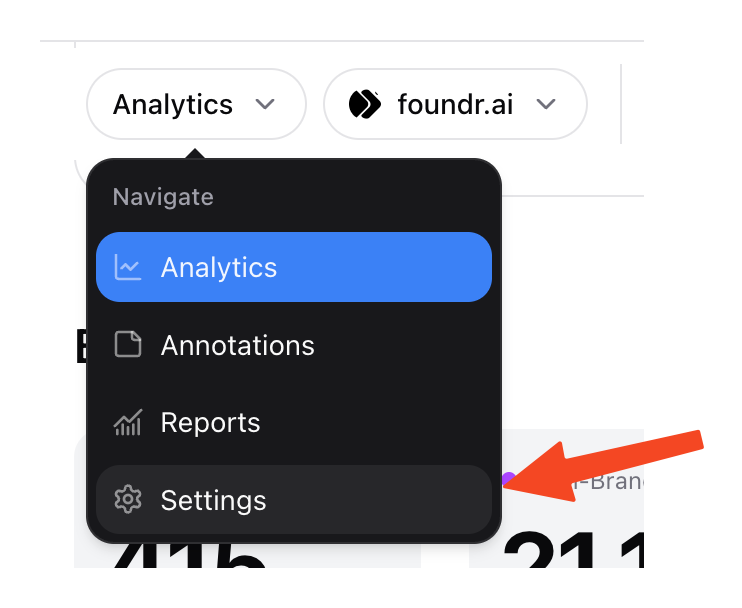
Now, scroll down and select “branded keywords” and add your branded keywords there.
Once added, the system will start capturing and filtering those queries and traffic.
Add all the keywords that you want, and you can modify them as required.
How To Filter Branded Or Non-Branded Traffic?
After adding keywords, the branded queries are visible in the dashboard as you scroll down. Sort them by branded or non-branded queries, or you can do it by both.
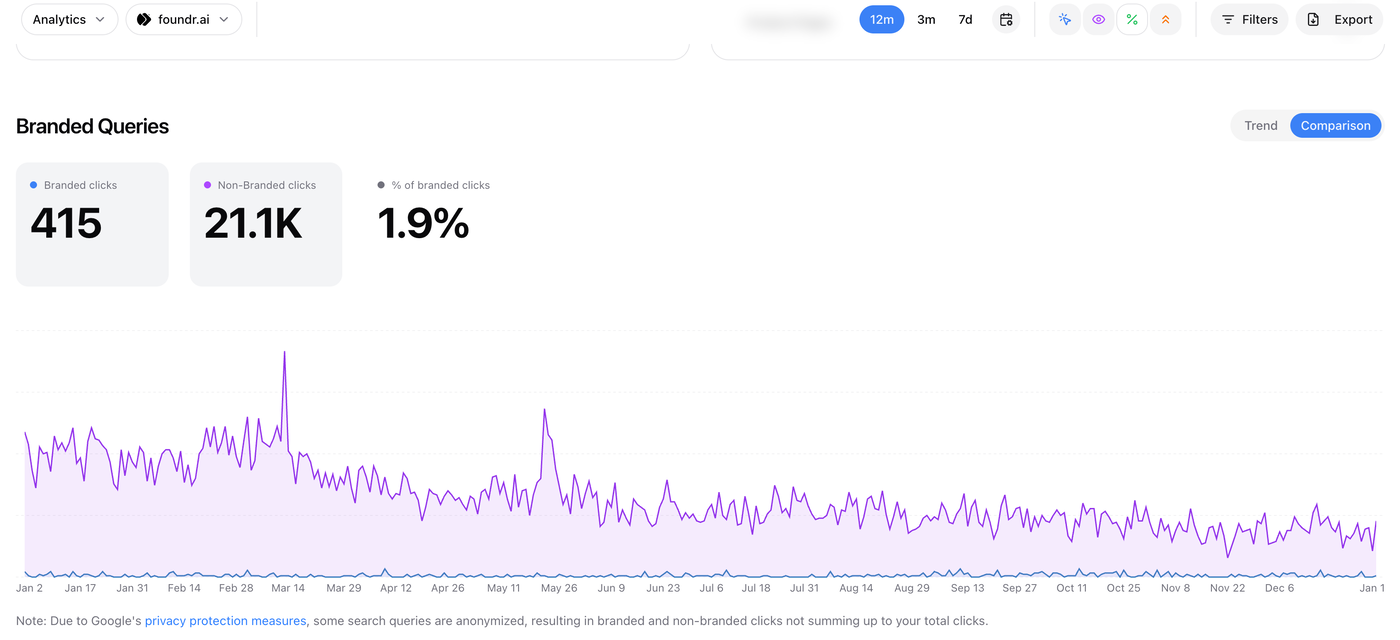
Accordingly, only those metrics will be visible, and you can modify them at any time later. Thus, you can monitor it now and check its popularity over time.