
Query counting for SEO: Track total keywords visibility
Get a detailed view of every query that your site ranks for as it overcomes the 1000-query cap of Google Search Console. Track changes in keyword visibility, understand algorithmic impact, and measure your complete SEO growth with detailed query data.
What Is Query Counting?
Query counting means how many different search queries lead to impressions for your site on any day. But it is not as simple as it sounds!
Conventional metrics, such as clicks and impressions, display how many views and visitors your site is receiving. On the other hand, query counting gives details about the amount of your site’s visibility. In simple terms, it shows how wide your website appears in different search results.
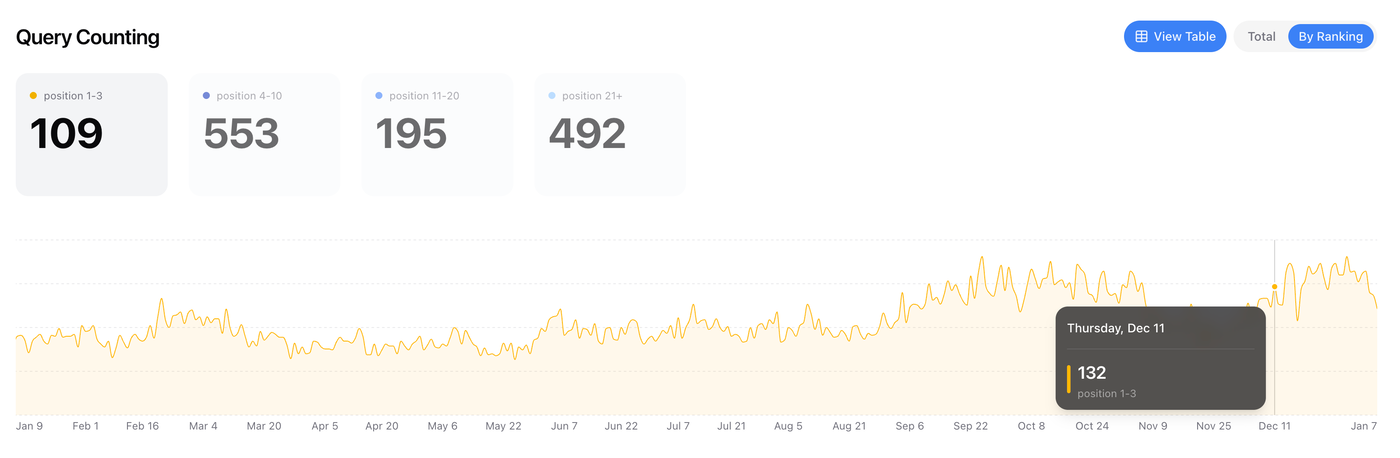
For example, if I check my site's GSC data for December 13, 2025, I can see that 172 queries generated impressions. Furthermore, upon clicking the date and checking the total rows, I would again see the same number; however, SERPView changes the game.
Why Is Query Counting Revolutionary?
Query counting is not necessarily linked to your site’s clicks, impressions, or similar. Many times, your site’s query count increases, but the clicks and impressions decrease. This is because the impressions might be coming from multiple different queries, although limited in number.
Similarly, your site's clicks often increase, but the query count decreases. Such insights enable you to analyze your site’s SEO more effectively.
Google Search Console offers this feature, but it anonymizes many searches beyond the 100-query limit. Hence, you only see 60%-70% of your site’s data. Here's where SERPView emerges as the game-changer.
How To Set Up Query Counting?
GSC allows query counting for free for a lifetime, but only 1000 queries are visible. Thus, sites that rank for more than 1000 queries (the ones that are in the growing phase) need tools like SERPView.
With it, query counting is available in the performance dashboard. In the SEO Monitoring Dashboard, beside branded and non-branded metrics, your site's total query counts are displayed.
We’ve broken down according to ranking position, which helps you monitor how many queries your site is ranking for, as well as which ones are in top positions.
3 Query Counting Situations And What They Mean For SEO
There are three query counting situations you will most likely encounter, and here's how you can interpret them:
Growth in Queries, Clicks, and Impressions
When the query count increases with clicks and impressions, it means;
The SEO strategy is giving good results.
Your site features quality content that ranks well for new topics.
Topic authority expansion for your site
The site is healthy and progressing.
Thus, you attract more traffic and increase visibility for a wide range of search terms.
More Clicks, Less Query Count
Such a pattern often confuses SEO experts. It is common to get more clicks yet rank for fewer queries.
This is what such a situation usually means:
Positions 1-3 are stable or growing.
A significant decline occurs in positions 4-10 and 11-20.
Here's why it happens:
Seasonality: Some fixed core topics are generating more interest (such as heaters in winter).
Brand Growth: Your site is not ranking for branded terms yet branded terms us generating higher clicks.
Ranking Improvement: Google shows you fewer queries, yet your site might be ranking for more queries.
Therefore, you should monitor the terms for which your site lost visibility. Often, your current content doesn't match the intent, hence you have to create new content to target those queries.
Hence, SERPView helps by displaying the queries for which your site was ranking in SERPs that are ideal for creating more targeted content.
High Query Counts, Clicks Low or Stagnant
When your site ranks for more queries but doesn't get more clicks, this means that:
Google suggests queries for related topics.
Your webpage does not answer queries that users need, and hence doesn't earn clicks.
So, you have to carefully analyze the new queries for which you rank. Thus, you have to decide if you want to
Enhance your existing webpage to effectively address user queries.
Create new and dedicated content to effectively target search and topic intent.
How To Make The Most Of Query Counting?
Query counting helps identify opportunities for making data-driven decisions. When you notice major changes in query counts, you have to search for:
Patterns in the query types gained or lost.
Ranking shifts for different query groups.
Chances to create content for queries like getting impressions, but not clicks.
The benefit of query counting is that it provides a high-level overview of your site's visibility and allows you to view specific query patterns as needed.