
How to share search console access with your client or anyone?
Have you struggled to share your site analytics with stakeholders, as you didn't want to give dashboard or analytics access?
Here’s where the shareable dashboard solves the problem and is a game-changer. With it you can:
Share dashboards as links with password-protection.
Embed those links into third-party service providers.
Revoke shared-link.
How To Create a Shareable Dashboard In Less Than 30 Seconds?
Go to your SERPView Dashboard and select the property you want to share the dashboard with.
Go to Dashboard > Details > Analytics > Settings.
Scroll down to the Share Dashboard option and click the Create Shared Link button.
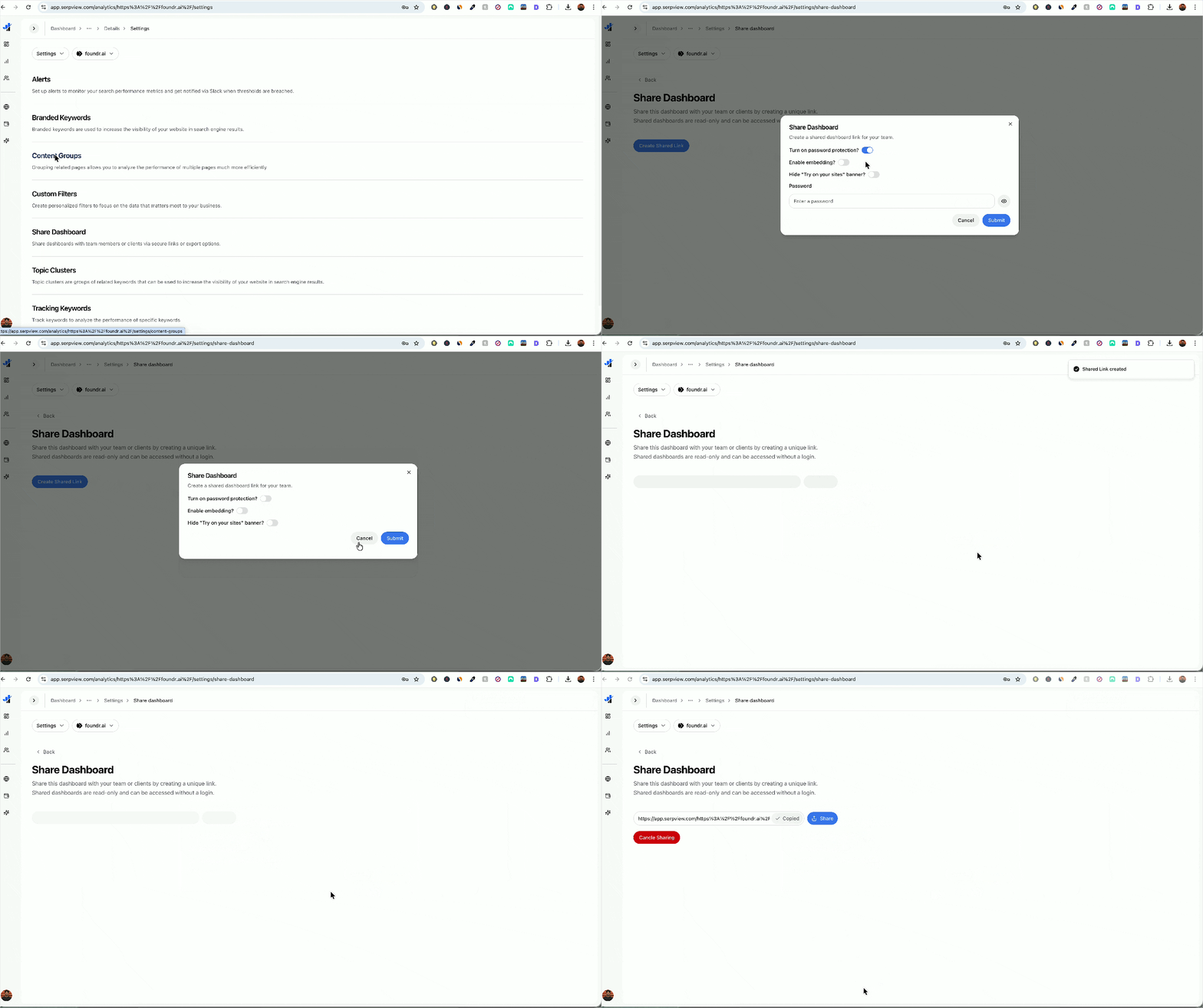
Enable the toggles that appear in the prompt box if required, and click Submit.
The Share Dashboard link appears; copy it and share it with whoever requires access, as they will not be able to access your GSC account or log in anywhere.
Why it is a very important feature for agencies and consultants?
The Shareable Dashboard is easy to set up and offers flexibility. Clients and stakeholders get access to:
Metrics filtering capabilities
Can see the annotations on your graph
Visibility of content groups
Complete access to topic clusters
Real-time data updates
Hence, they can see exactly what you see, which makes your discussions more productive and aligned without requiring a login.
This means they’re seeing exactly what you’re seeing, making your client discussions far more productive and aligned.
How To Make The Most of Shareable Dashboards?
Shareable Dashboards reduce your efforts, as meetings and conversations with stakeholders eliminate the need for reporting numbers, allowing you to focus on strategies. When you share the Dashboards with stakeholders, you can ask them to:
Filter using content groups to check which sections perform the best.
Analyse the real-time impact of recent content updates.
Monitor branded vs non-branded traffic patterns.
Such a high transparency proves your credibility and trust amongst clients, as they understand the value you can provide beyond SEO.
How To Make The Most of Embedded Dashboards?
While creating shared links, you can enable embedding, as they are crucial to agencies because of:
Greater Perceived Value: Your SEO reports give a comprehensive and custom-built impression.
Saves Time: Set up embedding once, and it automatically updates with fresh data.
Differentiation: Many agencies send static data like screenshots or PDFs even today, hence interactive dashboards make your agency distinct.