
How to Filter Website Data to Find SEO Opportunities?
SEO data reveals which keywords need more focus, which pages are losing visibility, and which areas can grow. But analyzing everything at once can make it challenging to identify opportunities. So by analyzing data across queries, pages, countries, devices, and date ranges, you can narrow your analysis and identify specific areas for improvement.
Here's where this guide will explain how to use data filters to find hidden content opportunities.
What Are SEO Data Filters?
SEO data filters narrow down the website performance data based on your chosen preferences. They eliminate the need to analyze the full data at once, allowing you to focus on the data relevant to your needs. For example, instead of analyzing performance for the whole URL at once, you can choose to check for a certain type of content or search phrases.
Some types of data filters in SERPView include:
Query: Check the performance for specific search terms or keywords
Page: Focus on checking the performance for a specific URL or group of pages.
Country: Identify how the performance differs across different countries and what works in each of them.
Device: Compare results and website performance across devices such as desktop, mobile, and related categories.
Date Range: Check the performance during a specific time period or compare across different time ranges.
Branded and non-branded queries: You can separate searches with your branded keywords from those that do not contain them. This way, you get a better idea of what works, your performance insights for the brand, and how to streamline it better.
SERPView also has data filters for long-tail keywords and People Also Ask queries. Additional options let you filter data from sources such as news or videos.
How to Apply SEO Data Filters in SERPView?
Applying SEO Filters in SERPView is just a matter of a few clicks. Follow the steps below:
Go to the SERPView dashboard and select the property that you want to analyze.
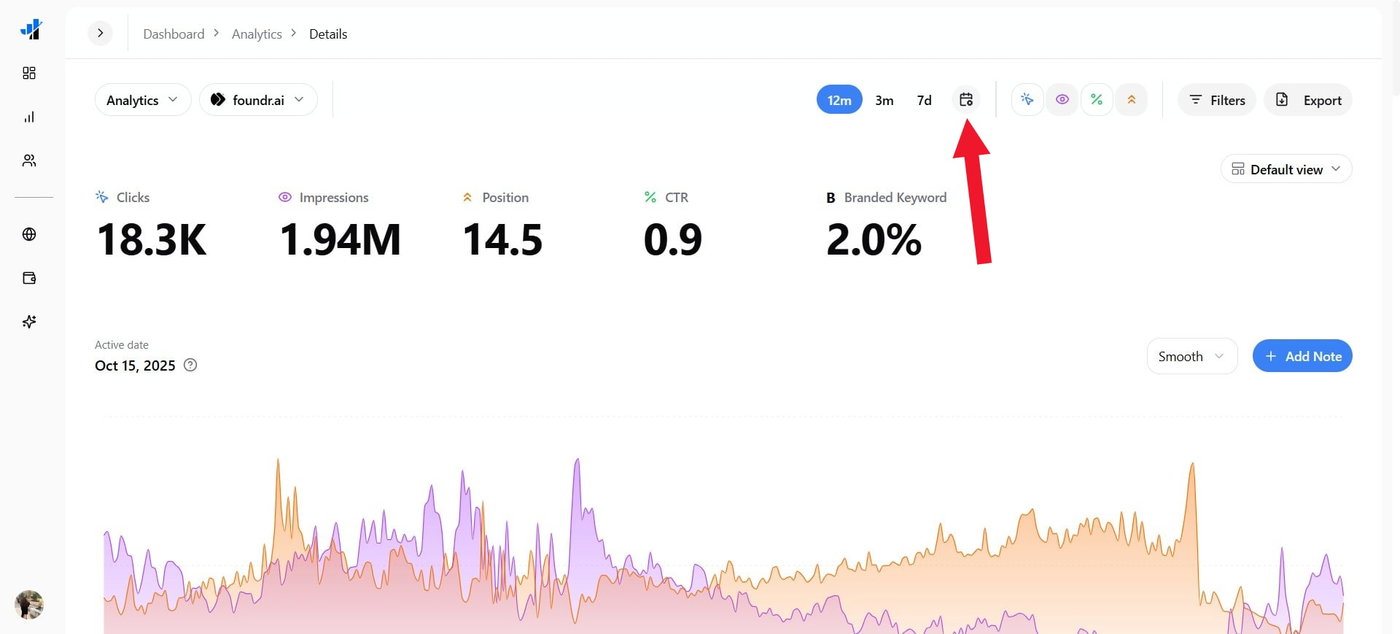
Choose the time range by clicking the Calendar icon for the date filter.
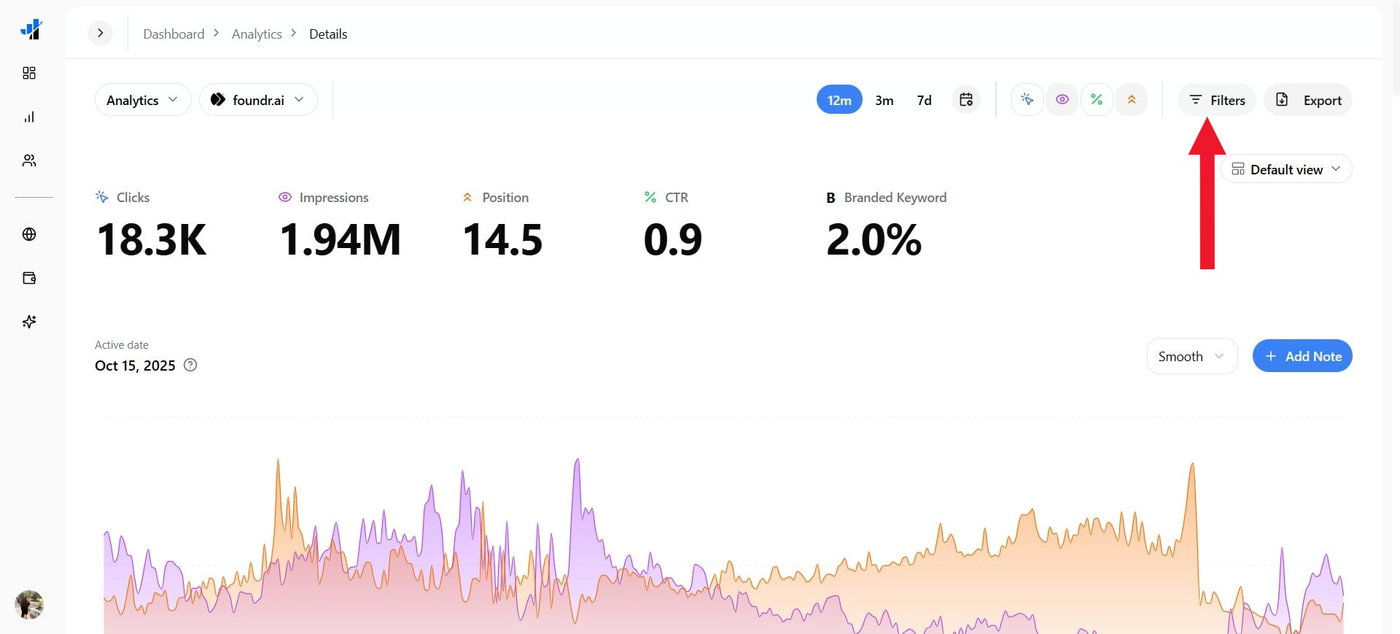
Click the Filters button at the top-right corner.
Apply Filters for Query, Page, Country, Device, Metrics, and Custom Filters as needed.
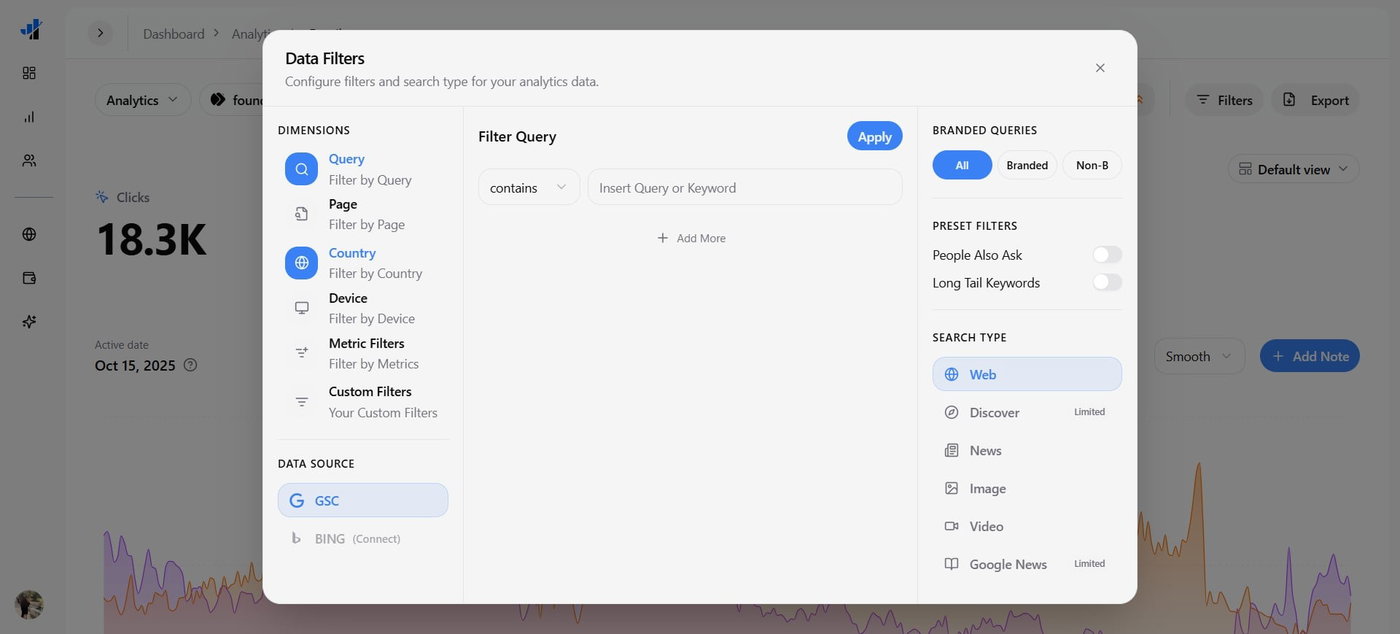
Accordingly, you can filter branded and non-branded queries, search type, data source, People Also Ask, etc. Ensure that you don't apply too many filters at once
How To Find SEO Opportunities Using GSC Data Filters?
SERPView sources its data from Google Search Console and offers several advanced features to find hidden insights. This lets you level up your strategies.
Here's how you can find SEO opportunities using it:
1] Find High-Impression Keywords With Low CTR
A page or query can appear frequently in search results without getting many clicks. This way, you can analyze the opportunities and strategies to improve how the result matches search intent and attracts relevant visitors.
Check for URLs or queries with high impression counts.
Check them against impressions, clicks, and CTRs.
Identify relevant queries that have a lower-than-expected CTR for their position and search intent.
Analyze the corresponding search results to understand how competitors' pages present their content.
Review the title link, meta description, content relevance, and eligibility to find relevant search-result features.
Accordingly, if the page is relevant but the search result isn't very compelling, then use a clearer title and improve the meta as needed. If the content is satisfying, then optimize the page itself. A low CTR alone does not mean that a title is the issue. Rather, search position, search intent, query type, and search results displayed influence the clicks.
2] Find Keywords Ranking Near Page One
Queries that are ranking around positions 8 and 20 are useful to analyze further. Some of them might already be yielding impressions, but they could gain more visibility if the page satisfies the search intent.
So, you should:
Check query-level performance and identify relevant terms with average positions between 8 and 20.
Analyze their impressions, clicks, CTR, and trends over time.
Find the pages getting impressions for those queries.
Open the pages and check whether they address the query clearly and in detail.
Identify whether the content needs an update, stronger internal links, clearer structure, or greater alignment with search intent.
Focus on queries that are relevant for your blog, already have meaningful impressions, and map them to webpages you can actually improve. Update existing content as needed rather than creating a new webpage for each keyword.
3] Analyze Webpages That Are Losing Organic Visibility
Over time, clicks often decline. This can be due to changes in SERPs, search volume, seasonality, technical issues, or algorithmic changes. So comparing performance over time lets you narrow down where to analyze.
Here’s how you should do it:
Choose a recent time range and compare it with a comparable previous period.
Check for changes in clicks, impressions, CTR, and average position.
Filter through pages to know which URLs are leading to a decline.
Know if the decline is affecting one page, a group of related pages, or the entire website,
For the affected queries, identify the reason for the decline by checking current search volume for those queries and similar ones, and ensure the pages are relevant and accessible.
Moreover, if the impressions are stable but the clicks are low, check the CTR and the search results preview. If multiple pages decline simultaneously, then check for broader site changes before rewriting independent pages.
4] Find Country-Specific SEO Opportunities
Search performance differs across countries due to demographic preferences, competition, language, demand, and user intent. For example, “best cheap microwave ovens” would perform well in India, as the audience here prefers affordable options. In comparison, “best microwave ovens with magnetron warranty” would rank well in the U.S. because its residents prioritize warranty over the magnetron.
Hence, country-level filtering lets you identify where a page or query will perform differently.
To use it well:
Filter the data based on a target country.
Review the queries and pages yielding impressions and clicks for that market.
Compare the metrics with another country or a suitable previous time range for which the options are available.
Analyze relevant queries that generated impressions yet have limited clicks.
Go through whether the landing page, terminology, currency, examples, and other elements align with the target audience.
Accordingly, optimize the strategies based on search and how they benefit users. Also, for an international audience, reviewing language, regional targeting, suitable URLs, and relevant technical implementation is important before you create more country-specific pages.
If your webpages have fewer clicks from a country, still don't underestimate it. Check the search volume in that region and whether your content aligns with its audience.
5] Compare Mobile and Desktop Search Performance
There is always a difference between mobile and desktop performance. This helps you know the areas that need further improvement. A page might attract impressions on both devices, but the CTR or click volumes might differ greatly.
So you should:
Apply the device filter to the data.
Check for clicks, impressions, CTR, and average position for each device category.
Know the pages of queries where the differences are massive and persistent.
Check for affected pages on each relevant device.
Review title and snippet relevance, mobile usability, page layout, and loading performance wherever needed.
Further, address issues such as difficult mobile navigation, obstructive page elements, etc which are difficult to view on smaller screens.
6] Find Non-Branded Keyword Opportunities
Branded searches have your brand, business, or product name, while non-branded usually describe a need, topic, product, category, or problem without naming the brand.
Thus, separating these groups lets you understand if search visibility is from people who already know your business or from those in the discovery stages of the marketing funnel.
Use SERPView's branded and non-branded filtering options.
Check which queries generated impressions and clicks in each group.
Find relevant non-branded queries with meaningful impressions but limited clicks or a weaker position.
Check whether an existing page addresses the query and satisfies the search intent.
Find relevant topics that need to be adequately covered for your current content.
Therefore, improve existing pages where there is a clear content gap or create a new page when the topic needs a separate resource. Use natural language that reflects the audience's needs rather than merely inserting keywords into the content.
Non-branded queries help you find opportunities to reach more audiences, though they might not be relevant to your business.
After identifying them, assess their potential for relevance, current performance, search intent, effort, and related factors.
Common Mistakes to Avoid When Filtering SEO Data
There are certain mistakes you should avoid to make the most of your efforts.
Applying too many filters at once: Start with a single factor, then add filters only as needed.
Comparison of random time ranges: Check for equivalent periods and consider search trends, virality, and changing search volume when analyzing performance changes.
Treating average position as the exact ranking: Analyze it with clicks, impressions, CTR, and query-level details.
Assuming low CTR always means poor titles: Consider ranking position, search intent, and search results as well when examining CTR.
Misunderstanding impressions decline: Impressions often change with changes in changes in search volume, seasonality, trends, and more, not something on your webpage. So understand the real cause.
Conclusion
SEO data filters help to simplify a large volume of search performance data for focused review. By reviewing queries, pages, countries, devices, and more, you can identify potential CTR improvements, content updates, visibility declines, and opportunities for non-branded keywords.
Another useful filter is the one that helps to answer a particular SEO question. Use the results to analyze performance, prioritize opportunities with evidence, and make and monitor changes accordingly.
Know how to signup at SERPView for free now!